Add Matterport, iGUIDE and Kuula tours to ShotVista listings
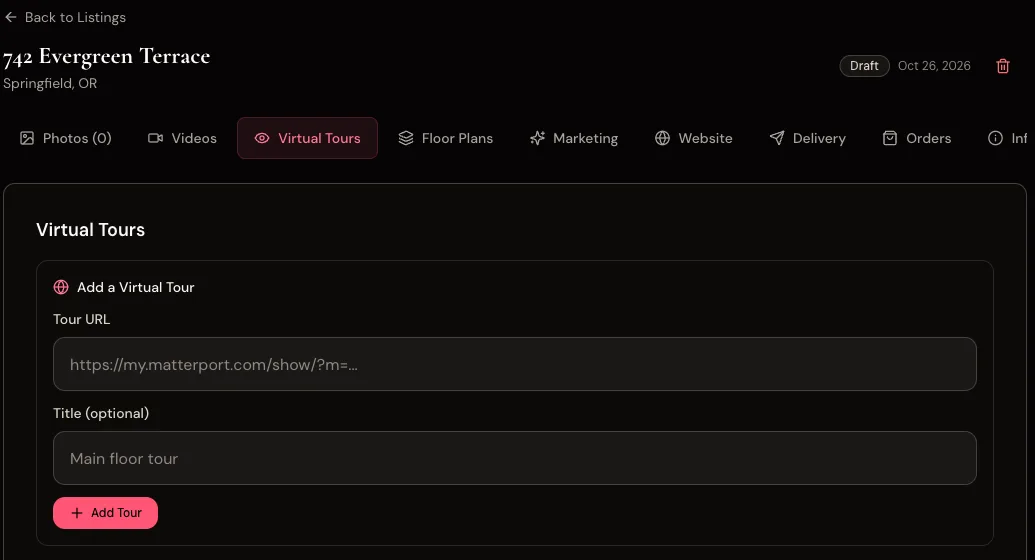
Paste a Matterport, iGUIDE or Kuula tour link on a ShotVista listing and it is saved with the listing and previewed in the listing’s Virtual tours tab, so the tour sits next to the photos, video and floor plans for that property. ShotVista does not capture or host 3D tours.
- Who it is for
- Photographers who already shoot 3D or 360° tours with another tool and want to keep every asset for a listing in one place.
- Plan
- Available on every plan.
What it does
- Save one or more tour links on a listing, with an optional title.
- Recognise the provider from the link: Matterport, iGUIDE, Kuula, Zillow 3D Home and Ricoh360.
- Preview the tour inside the listing.
- Remove a tour from the listing.
When it runs
- You add or remove a tour link manually.
Set it up
- Copy the share link of the tour from Matterport, iGUIDE or Kuula.
- Open the listing in ShotVista and go to the Virtual tours tab.
- Paste the link, add a title if you like, and click add.
Example
You paste https://my.matterport.com/show/?m=… on a listing. ShotVista labels it as a Matterport tour and shows the interactive preview in the Virtual tours tab.
Limits
- ShotVista does not create, capture or host tours; the tour stays on the provider’s platform and plan.
- Tours are not yet shown on the public property website or the client delivery page; send the tour link to the client yourself.
- Some providers block embedding for private tours; the preview then stays empty while the link still works.
Troubleshooting
- The preview is blank.
- The tour is private or the provider does not allow embedding. Make the tour public in the provider’s settings, or keep the link for reference.
Checked against the product in October 2026. Questions: [email protected].
Questions
- Does ShotVista make 3D tours?
- No. It stores links to tours made with Matterport, iGUIDE, Kuula or similar tools.
Try ShotVista on one of your photos
New accounts get 2 free credits, enough for one photo in 4K. No card required.
Try 1 photo free